From raw audio to intelligent document.
Record a hearing, a class, or a meeting and walk away with the finished document — transcribed by the right engine, organized by AI, and formatted the way your work needs it.
Dashboard
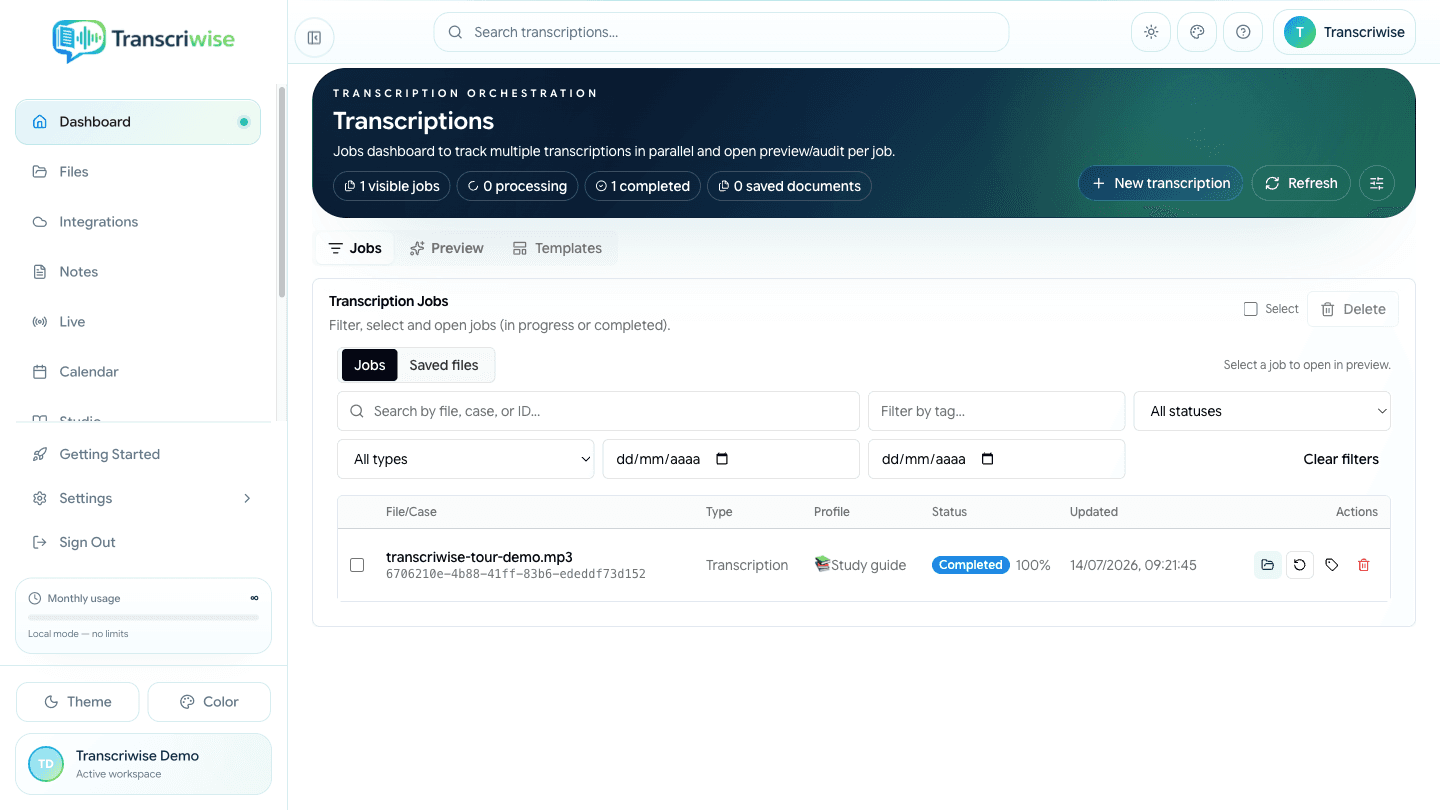
Jobs, status, filters, and access to results.
From capture to delivery. No manual steps.
Three integrated stages designed to reduce rework.
Capture
Files, microphone, meetings and cloud
- File upload (MP3, MP4, WAV, M4A…)
- Live transcription via microphone
- TranscriBot (Zoom, Meet, Teams)
- Dropbox, Gmail and Google Drive
Process
Configurable accuracy, context preserved
- 9 transcription engines — Whisper, Deepgram, AssemblyAI, ElevenLabs, Soniox, Gladia, Voxtral, iFlytek and Alibaba — auto-matched to your audio, language, and context
- Speaker diarization
- Fidelity audit with targeted review
- Automatic formatting for Brazilian legal documents (PT-BR)
Deliver
Right format, right destination
- 9 analysis and creation tools in Studio
- DOCX, PDF, TXT and SRT — plus extra formats where supported
- Send straight to Google Docs, Dropbox or Gmail
- 41 native and automated connections for input, delivery, and automation
AI Sidebar
A complete analysis session, right beside the document.
Chat with any transcription using Gemini, Claude, GPT, Qwen or GLM — pick the model per question. Pull out a summary, the action items (with assignee, deadline and priority) and content insights, then turn the whole thing into a structured document from an AI template. It all happens beside the transcript; you never leave the page.
Gemini, Claude, GPT, Qwen and GLM — choose the ideal model for each conversation
Key points, topics and action items extracted automatically
Tasks with assignee, deadline and priority — mark as complete
Generate structured documents that come out in the right format every time
Transform transcriptions into posts, articles, threads and more
Sentiment analysis, recurring themes and content metrics
Studio — 9 analysis and creation tools.
From transcription to content. In one click.
Select one or more transcriptions as sources, choose an output — from an executive briefing to a study guide, mind map or two-host podcast — and let Studio build it. Every result stays editable in the Document Canvas.
Podcast/Audio
Generate an audio conversation between two hosts from your transcriptions
Executive Briefing
Actionable summary with decisions, risks and next steps
Study Guide
Structured lessons with clear sections and learning objectives
Flashcards
Study cards with self-scoring: know / review / don't know
Mind Map
Visual diagram of concepts and relationships
FAQ
Questions and answers generated from content
Review Table
Compare sources, evidence and notes in a structured table
Timeline
Timeline of events and milestones
Document Canvas
Document editor with revisions, version history and an image gallery
Notebook
Ask one question across every recording, PDF and note at once.
Bring several transcriptions, PDFs, pasted texts and URLs into one shared context, then question all of it at once. Switch between four chat personas — Standard, Study, Critical and Executive — each with its own instructions, run any of the nine Studio tools on the combined sources, and keep your highlights and notes saved in the session. A relevance search finds the right passage across everything you added.
- Multiple sources in a single AI context
- 4 chat personas with specialized instructions
- All 9 Studio tools available
- Persistent highlights and notes
- Search everything in your Notebook by relevance
Combine transcriptions, PDFs, notes and URLs in one workspace
Standard, Study, Critical and Executive — each with specialized instructions
Use all 9 analysis and creation tools directly in the Notebook
Annotations and highlights saved automatically in the session
Live Transcription
Transcribe meetings, hearings and interviews as they happen, straight from your microphone or a browser tab. Watch speaker panels update live, turn on a configurable subtitle overlay, and keep the AI sidebar open to ask questions mid-session. When you stop, the whole session is saved as a transcript, ready to format and export.
- Real-time speaker panels
- Configurable subtitle overlay
- Active AI chat during the session
- Session saved as a transcript, ready to export
75 specialized templates. Formats by country and proceeding type.
Specialized legal templates
75 ready structures organized by country, court or authority and proceeding type — civil, labor, criminal, small claims, appellate and more — each with the sections, headers and vocabulary the document is expected to carry.
Fidelity Audit
Automatic detection of low-confidence passages so review stays focused where it is needed.
- Confidence score per segment
- Finding-driven targeted review
- No intervention on clean passages
Legal Corpus
Brazilian legislation, case law and doctrine can be indexed in the corpus and retrieved in AI context.
- Index the Constitution and statutes into your base
- Add STF/STJ binding precedents and rulings
- Doctrine and articles you can index yourself
Create dictionaries by field with names, acronyms, and technical terms relevant to your work.
Right format. Right destination.
Export directly to where the work happens.
Export formats
Integrations
Compare plans
See everything included in each plan, side by side.
| Feature | Starter | Pro | Business | Enterprise |
|---|---|---|---|---|
| Transcription hours/mo | 15h | 50h | 100h/seat | Contract |
| Formatted hours/mo | 10h | 30h | 80h/seat | Contract |
| AI points/mo | 80k | 250k | 750k/seat | Contract |
| Model selection (Gemini, GPT, Claude, Qwen, GLM) | ✓ | ✓ | ✓ | ✓ |
| safe / fast / turbo profiles | ✓ | ✓ | ✓ | ✓ |
| Speaker diarization | ✓ | ✓ | ✓ | ✓ |
| Full export (PDF, DOCX, SRT, TXT) | ✓ | ✓ | ✓ | ✓ |
| AI Chat (Studio) | ✓ | ✓ | ✓ | ✓ |
| Summary, outline, mind map | ✓ | ✓ | ✓ | ✓ |
| Translation | ✓ | ✓ | ✓ | ✓ |
| TranscriBot (Zoom, Meet, Teams) | ✓ | ✓ | ✓ | ✓ |
| Study materials | ✓ | ✓ | ✓ | ✓ |
| Fidelity audit | ✓ | ✓ | ✓ | ✓ |
| AI Templates | View only | ✓ | ✓ | ✓ |
| Max quality (Pro models) | — | ✓ | ✓ | ✓ |
| Point top-ups | — | ✓ | ✓ | ✓ |
| Custom dictionaries | ✓ | ✓ | ✓ | ✓ |
| API + Webhooks | — | ✓ | ✓ | ✓ |
| Multi-user (workspace) | — | — | ✓ | ✓ |
| SSO / SAML | — | — | — | ✓ |
| White-label | — | — | — | Contract |
| Dedicated SLA | — | — | — | Contract |
| On-premise deployment | — | — | — | Contract |
| BR data residency | — | — | — | Contract |
Start in minutes. No lock-in.
Get the models included in your plan, plus the AI Sidebar, Studio and Notebook — cancel anytime.